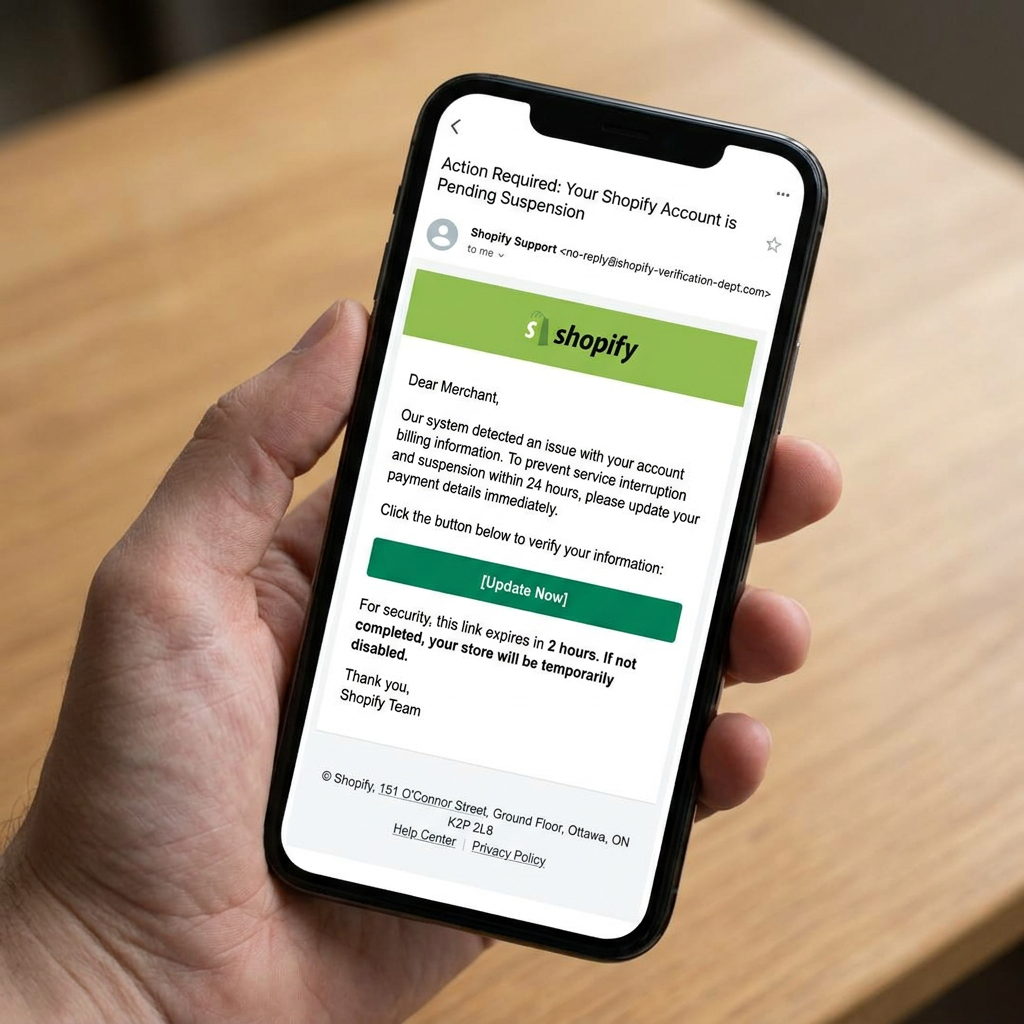
Overview
- The email claims that a Shopify store has been suspended because of a chargeback.
- It tells the recipient to complete an urgent account verification process.
- Both verification links point to
hxxps://uhue5fd9[.]s3[.]amazonaws[.]com/2558e.html, not a Shopify domain. - After the link was opened, the browser showed
accounts-shopify-store[.]blumenhaus-schaper[.]de, a completely unrelated domain, followed by a Cloudflare 520 host error. - The exact intermediate redirect mechanism could not be independently confirmed, so this breakdown distinguishes what was observed from what is inferred.
What Kind of Scam Is This?
This is a Shopify impersonation phishing email, specifically an account-verification/account-takeover lure.
The message creates a believable business problem — a chargeback and account suspension — then presents verification as the solution. The intended psychological sequence is straightforward:
Something is wrong with your store → your account is restricted → verify immediately → click the button.
That is exactly the type of phishing workflow Shopify warns about. Shopify says phishing messages can impersonate trusted sources and use links or forms to obtain account information and credentials. It also advises merchants to verify the sender domain and be suspicious of unfamiliar URLs.
The important part here is that we do not need to guess what the attacker intended based only on the wording. The link provides much stronger evidence.
Step 1 — Sender Analysis
The supplied HTML does not contain the original From: address or full email headers.
That means we cannot confirm the actual sender address from the evidence available here.
What we can confirm is the claimed identity:
Shopify Account Security
The email uses:
- Shopify branding
- the Shopify logo
- Shopify terminology
- a Shopify corporate address
- a chargeback/account-suspension scenario
- an “Account Security” sign-off
That establishes brand impersonation, but it does not establish that the message originated from Shopify.
This distinction matters. A convincing display name is not sender authentication.
Shopify currently states that legitimate Shopify emails come from official domains including shopify.com, email.shopify.com, em.shopify.com, and shopify-billpay.melio.com.
For a future version of this investigation, the raw headers would be useful. They would let us inspect the actual sender domain, Reply-To address, authentication results, and mail-routing information.
Step 2 — Email Body Red Flags
The message is professionally formatted. That is part of the problem.
There are several things worth separating.
1. The chargeback creates a plausible business emergency
The opening claim is:
“A chargeback was filed on a payment associated with your store.”
Chargebacks are real. Shopify merchants genuinely deal with them. That makes the scenario believable.
The scam doesn’t invent an obviously ridiculous problem. It chooses something a store owner knows can happen.
2. The email immediately connects the problem to account suspension
The message says:
“Your account is suspended pending verification”
and later:
“Complete verification as soon as possible”
This creates pressure to act before investigating.
Shopify itself lists urgent or threatening language as a common phishing warning sign.
3. The email uses real Shopify details
The footer contains:
Shopify, 151 O’Connor Street, Ground floor, Ottawa ON, K2P 2L8
That address is real. Shopify’s current corporate and legal information confirms 151 O’Connor Street as an official Shopify address.
That does not make the email legitimate.
It demonstrates an important phishing technique: copying genuine information from the impersonated company.
The attacker doesn’t need to invent a convincing address. They can copy one.
4. The logo is genuinely hosted on Shopify’s infrastructure
The HTML loads the Shopify logo from:
https://cdn.shopify.com/static/email-modules-library/img/LogoPrimary_light.png
That is another interesting detail.
The image URL really does use shopify.com, but the actual action links do not.
This is a useful lesson:
An email can contain legitimate resources from the real company and still be malicious.
A logo is branding. It is not authentication.
Step 3 — Extracting the Link Without Clicking It
The HTML gives us the actual destination.
Both the “Verify account now” button and the “Continue to verification” link point to:
hxxps://uhue5fd9[.]s3[.]amazonaws[.]com/2558e.html
That is the first major technical finding.
It is not:
hxxps://shopify[.]com/...
It is an Amazon S3 URL.
Amazon S3 is a legitimate cloud storage service and can host websites and application content. The fact that a URL uses S3 does not make it malicious by itself.
But there is no obvious reason for a Shopify account-verification action to send a merchant directly to an arbitrary S3 object named:
2558e.html
There are also no visible Shopify-specific parameters in the URL.
The important point is simpler:
The email claims Shopify. The link does not lead to Shopify.
Shopify specifically warns that phishing messages can hide destination URLs behind link text and recommends checking the actual URL before interacting with it.

Step 4 — What Happened After the Link Was Opened
This is where the email becomes particularly interesting.
The supplied screenshot shows the browser at:
accounts-shopify-store.blumenhaus-schaper.de/index.html
Defanged:
hxxps://accounts-shopify-store[.]blumenhaus-schaper[.]de/index.html
That is not Shopify.
The domain structure is worth looking at:
accounts-shopify-store . blumenhaus-schaper . de
└────── subdomain ──────┘ └── actual domain ──┘
The important domain is:
blumenhaus-schaper.de
The words accounts-shopify-store are merely a subdomain.
Public business listings associate blumenhaus-schaper.de with Blumenhaus Schaper, a flower shop in Neustadt am Rübenberge, Germany.
That raises an obvious security question: why would a flower shop’s domain contain a subdomain called accounts-shopify-store?
We cannot confirm from the available evidence whether that domain was compromised, misconfigured, delegated to someone else, or deliberately registered for the campaign.
But the combination is significant:
Shopify-themed email → Amazon S3 URL → Shopify-looking subdomain on an unrelated business domain.
That is consistent with a phishing infrastructure chain.
One important limitation
We do not have a captured HTTP transaction showing:
S3 → HTTP 302 → blumenhaus-schaper.de
So we should not publish that as a confirmed redirect chain.
What we can document is:
Email link
↓
hxxps://uhue5fd9[.]s3[.]amazonaws[.]com/2558e.html
↓
Observed browser destination
hxxps://accounts-shopify-store[.]blumenhaus-schaper[.]de/index.html
↓
Cloudflare 520
The exact mechanism between the first and second URLs remains unconfirmed.
Step 5 — The Cloudflare 520 Error
The browser screenshot shows:
Web server is returning an unknown error
Error code 520

Cloudflare documents 520 as meaning that the origin server returned an empty, unknown, or unexpected response. Common causes include origin crashes, malformed responses, or server configuration problems.
The screenshot therefore does not prove that Cloudflare identified the website as malicious.
It tells us something narrower:
The host was not successfully serving the expected page when it was tested.
That could happen because:
- the phishing infrastructure was broken;
- the origin server was misconfigured;
- the site had already been taken down;
- the hosting account had changed;
- the attacker infrastructure was temporary;
- or the server simply failed.
We cannot distinguish those possibilities from the screenshot alone.
And that distinction matters.
A broken phishing page is still a phishing email.
Step 6 — Safe Environment Testing
The evidence available for this investigation consists of:
- the original HTML supplied for the email;
- the supplied email screenshot;
- the supplied browser screenshot;
- external verification of Shopify’s published phishing guidance;
- external verification of the Cloudflare 520 behavior;
- public information associating
blumenhaus-schaper.dewith a German flower shop.
A direct automated fetch of the S3 URL from the analysis environment was unsuccessful because the environment could not resolve the hostname. Therefore, I cannot independently confirm the HTTP response or redirect headers from the S3 object.
That limitation should stay in the published article rather than being replaced with an assumed redirect chain.
Step 7 — What the Endpoint Appears to Be Doing
We can establish the phishing function of the email more confidently than the exact function of the endpoint.
The email’s stated purpose is account verification.
The link does not point to Shopify.
The observed destination is an unrelated domain using a Shopify-themed subdomain.
The page that was ultimately reached was not a Shopify verification page.
Taken together, this is consistent with an account-verification phishing workflow.
What we cannot establish from the evidence is whether the endpoint:
- collected a Shopify username and password;
- collected an email address;
- captured authentication codes;
- redirected to another phishing page;
- performed target tracking;
- or was simply broken by the time it was tested.
There is no observed credential form in the supplied evidence.
So the article should not claim that credentials were definitely stolen.
The correct conclusion is narrower:
The email attempts to make the recipient trust a Shopify account-verification process, while the verification link leads outside Shopify to unrelated infrastructure.
That is sufficient to classify the message as phishing.
Step 8 — What Would Happen in a Real Scenario
The intended workflow is straightforward.
A merchant receives a message claiming that their store has been suspended.
They are told that a chargeback caused the suspension.
They are given an urgent verification button.
They click.
The link takes them away from Shopify.
At that point, the attacker-controlled infrastructure can potentially present whatever second-stage content the campaign requires.
That could be a fake Shopify login page, an information-collection form, or another step in the phishing workflow.
But because the observed endpoint currently returns a Cloudflare 520, we cannot say which second stage this particular campaign used.
This is an important lesson in forensic analysis:
A broken endpoint doesn’t erase the evidence in the email.
Attack infrastructure gets removed, expires, breaks, or changes. The email source can preserve what the campaign was trying to make the victim do.
What This Teaches Us
This email demonstrates several techniques that are more useful to understand than simply memorizing “look for bad spelling.”
1. A realistic problem makes a better lure than an unrealistic one
“Your store has been suspended because of a chargeback” is plausible to a Shopify merchant.
The attacker doesn’t need to invent a bizarre story. They need to create enough uncertainty that the recipient clicks before checking.
2. Real branding can be completely genuine
The Shopify logo is loaded from a real Shopify CDN URL.
The Shopify corporate address is real.
The terminology is plausible.
None of those facts authenticate the email.
Branding is not identity verification.
3. The domain hierarchy matters
This is one of the most useful lessons in the entire example.
Look at:
accounts-shopify-store.blumenhaus-schaper.de
A rushed reader may notice:
accounts-shopify-store
and mentally associate it with Shopify.
But the actual domain is:
blumenhaus-schaper.de
Read domains from right to left, starting at the top-level domain.
4. A legitimate hosting provider does not make the content legitimate
amazonaws.com is legitimate infrastructure.
So is Cloudflare.
Attackers can use legitimate cloud providers and legitimate hosting services to deliver malicious content.
The question is not:
“Is Amazon legitimate?”
The question is:
“Why is this particular Shopify verification request being delivered through this particular Amazon S3 object?”
5. A dead phishing page is still evidence
By the time someone investigates a campaign, the infrastructure may already be broken.
That doesn’t turn the original email into a legitimate notification.
The email’s claimed identity, requested action, destination URL and observed destination can still establish the nature of the attack.
Key Takeaways
- Check the actual domain, not the words in the subdomain.
accounts-shopify-store.blumenhaus-schaper.deis not a Shopify domain. - A legitimate logo proves almost nothing. Attackers can embed images directly from the real company’s CDN.
- Real company addresses can be copied. The Ottawa address in this email is genuine, but that information can simply be copied into a fraudulent message.
- A cloud-provider URL is not automatically trustworthy. AWS S3 is legitimate infrastructure; the object stored there can still be part of a phishing campaign.
- Don’t equate a broken page with a harmless email. The observed 520 error tells us the endpoint was failing, not what the attacker originally intended to serve.
Final Verdict
| Category | Result |
|---|---|
| Sender legitimacy | Impersonation; actual sender not available in supplied headers |
| Link transparency | Misleading — button hides an AWS S3 destination |
| Final destination | Non-Shopify subdomain on blumenhaus-schaper.de; Cloudflare 520 observed |
| Immediate risk | Medium |
| Strategic intent | Account-verification phishing; credential collection is plausible but not directly observed |
Repeatable Checklist: How to Check a Shopify Email Scam
- Don’t start with the logo. Start with the sender address and domain.
- Check the actual link destination. Hover over buttons or inspect the HTML before opening them.
- Read the domain from right to left. In
accounts-shopify-store.blumenhaus-schaper.de, the important domain isblumenhaus-schaper.de, notaccounts-shopify-store. - Don’t trust copied company information. Addresses, logos, legal text and brand colors can all be copied.
- Be suspicious of urgent account-verification requests. Shopify specifically identifies urgent language, unfamiliar links and requests for sensitive information as phishing indicators.
- Open Shopify manually instead of using the email link. Go to your normal Shopify login/admin entry point and check whether the claimed problem actually exists.
- If you clicked, don’t automatically assume your account is compromised. Check what you actually entered. If you submitted credentials or sensitive information, Shopify recommends changing the password, enabling two-step authentication, and contacting Shopify Support to check for unauthorized access.
- Report suspected Shopify phishing. Shopify says phishing messages can be forwarded to
phishing@shopify.com.
Stay Safe With EmailClarity
Every week, we break down real scam emails targeting online store owners — the kind that land in your inbox pretending to be Shopify support, fellow entrepreneurs, or marketing geniuses who can triple your sales overnight.
Use our email analysis tool at scan.email-clarity.com to scan suspicious emails instantly, or forward anything sketchy to blog@email-clarity.com and we’ll give it our honest take.
The more emails we collect, the more store owners we can help. Your sketchy inbox is someone else’s warning sign.
Stay sharp out there.
— The EmailClarity Team
Leave a Reply